




From the brand


Welcome to Ophayapen official!
Ophayapen have been specializing in research and manufacturer smart pen for years.
The Smart Pen Set integrates traditional writing with digital, captures handwritten notes on specialized paper or board, instantly syncing them via Bluetooth to the Ophaya pro+ App on smartphones.
Convert ideas into editable digital formats, organize notes, and share across App. Ideal for students and professionals.
Four Smart pen Combo Packages
Replacement-Paper/Pen Refills

Smartpen+Notebook+Board Set
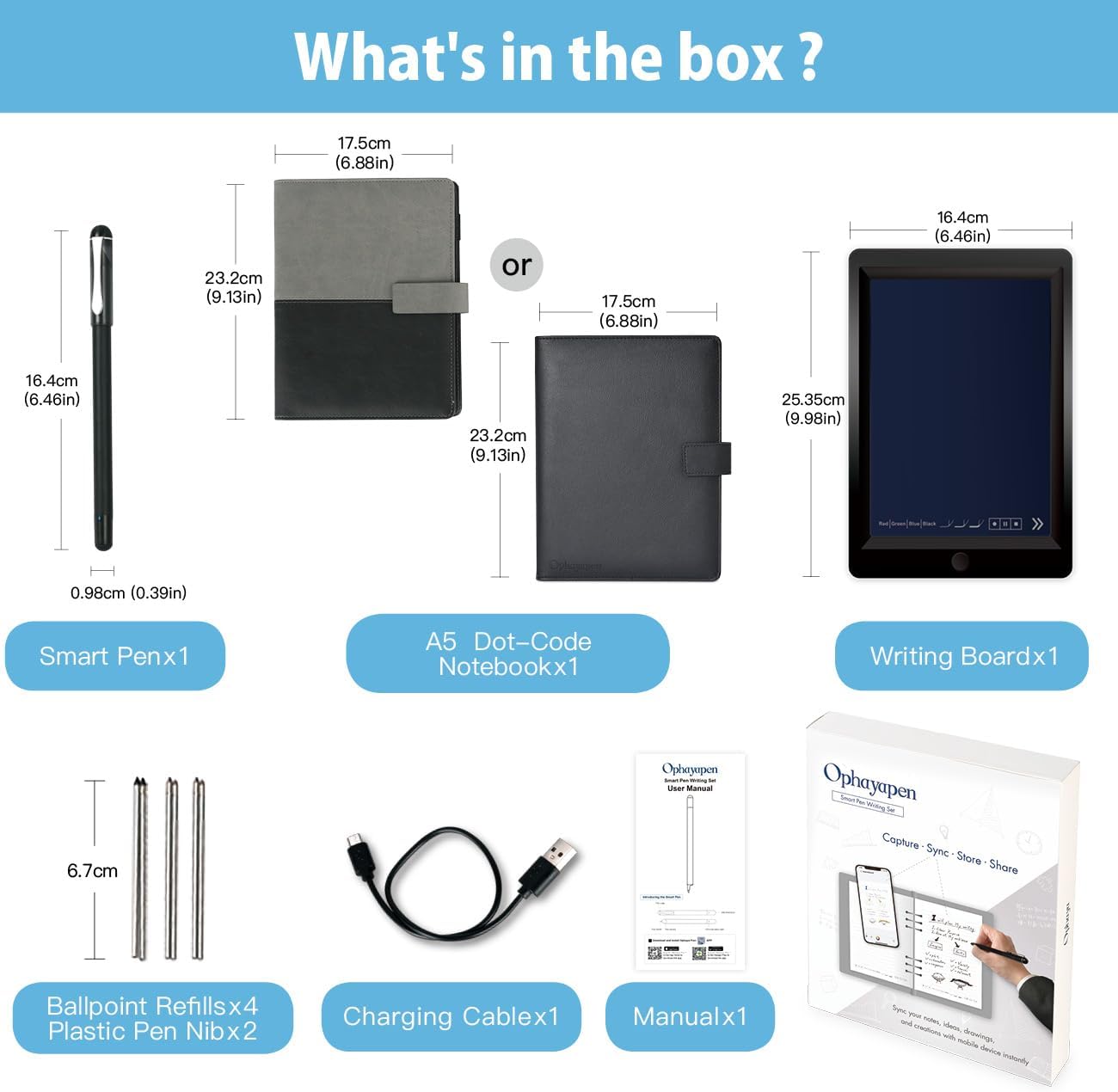
What’s in the box1x smart pen, 1x A5 dot-code notebook(60sheets), 1x writing board, 4x ballpoint refills, 2x plastic Pen Nib, 1x charge cable, 1 x manual

Smartpen+WritingBoard Set
What’s in the box1x smart pen, 1x writing board, 2x plastic Pen Nib, 1x charge Cable, 1x manual

Smart Pen + Mini Notebook Set
What’s in the box1x smart pen, 1x Mini Notebook, 2 x ballpoint refills,1x charge Cable, 1 x manual

Special Paper Notebook
The smartpen connects to the app to digitally capture your writing on Paper Notebook.

Special Writing board
The smartpen connects to the app to digitally capture your writing on the writing board.

Replacement paper refill
The smart pen+notebook+board set includes a PU notebook with 60 sheets of special paper refill. Once the inner paper is used up, you can purchase replacement refills at our amaozn ophayapen store (Note: Ophayapen smart pens are only compatible with Ophayapen-branded paper)

Replacement pen refill
The set includes 6 pen refills. Once the pen refill is used up, you can purchase replacement refills at our amaozn ophayapen store (Note: Ophayapen smart pens are only compatible with Ophaya-branded pen refill).
Is it possible to operate the described functions on the writing board?
No, the writing board is just an alternative to paper writing tool, you should use the smart pen Bluetooth connect to the APP, and the content what you write on the writing board will be synchronized to the APP, and then all the functions need to be operated on the APP.
Is there a fee for the APP?
Hello, no need, APP is free!
Can this smart pen be used with any paper or other product?
Only support any Ophayapen branded products
【Free APP-Ophaya Pro+】 Instantly Sync,Effortlessly Captures handwritten notes and drawings with precision, synchronizing them in real-time to devices with the Ophaya Pro+ app(Suitable for iOS and Android smart phone), Never miss an idea again
【OCR Handwriting Recognition】Handwritten text can be converted to digital text, which can then be shared as a word document.
【Searchable Handwriting Note】Handwritten notes can be searched using keywords, tags, and timestamps, making it easier to find specific information.
【Multiple note file formats for storage and sharing】 PDF/Word/PNG/GIF/Mp4 (Note: Multiple PDF and png files can be combined before sharing).
【Audio Recording】 Records audio simultaneously while you write, allowing you to sync your notes with the corresponding audio for context. and Clicking on the notes allows you to locate and play back the corresponding audio content.
【Offline Storage】This feature allows you to continue writing and saving content even when not connected to your phone. Once reconnected, the saved content will automatically upload to the app, which is especially useful for preventing the loss of key information during work or class, helping you review important details later.
【Customizable settings】 Allow users to select different pen thicknesses, colors, and other personalization options in the app, enabling eraser functionality for editing and providing a better writing experience.
【What’s in the box】 1x smart pen, 1x Pu Notebook (60 sheets), 4x Ballpoint Refills, 2x Plastic Pen Nib, 1x USB-C Cable


sophie8579 –
Amazing Smart Pen — Makes Note-Taking So Much Easier!
The Ophayapen Smart Sync Pen has completely upgraded the way I take notes. It writes smoothly on paper, and the real-time sync to my phone and iPad works flawlessly. I love that it can digitize my handwriting, convert it to text, store everything, and share notes instantly through the app. The included notebook and writing board make the whole setup feel professional and organized. Perfect for work, meetings, and study — accurate, convenient, and truly time-saving. Highly recommend!
Kurt007 –
Great Product
I am surprised at all the negative reviews. This was not my experience at all. I regularly read reviews and those reviews feel like someone review bombed this product.I run a lot of meetings and take a lot of notes. But typing distracts me from the flow and management of the meeting. For me, writing on paper is much less distracting. But the problem is that my notes then need to be typed up. Ophaya is the perfect solution for me as it takes my handwritten notes and, with one click, types them up on my cell phone. Then I can quickly edit through them to expand them from notes to reports or summaries.My hand writing is terrible but the first time I used Ophaya it did an amazing job recognizing my words with only a couple of misses (but I couldn’t read them either 🙄) And it did this right out of the box.It comes with a nice tablet sized notebook with paper and a very nice magnetic closing cover. The cover has space inside for spare ink cartridges, with pockets for ID, business cards, and a pen that writes on paper and on the included tablet. The tablet is perfect for sketching out ideas or diagrams like one might do on a whiteboard.It’s very simple to link your cell and the pen. When you do, Ophaya, through the free included app, automatically puts what you write on the notebook paper into the cellphone, including any doodles or diagrams.As you handwrite notes you can change the color of the digital ink with a tap to the notebook paper to keep concepts or content color separated. It’s the tool I have waited a long time for. I’m sorry I didn’t know about it sooner.
Jason T –
Terrible app
So I had previously used a Livescribe Echo and really loved it. I lost the pen and wanted to try something different. I’m really disappointed with this. A couple things to understand, the audio recording is done on your phone, via their Ophaya Pro+ app. So keep in mind that notification sounds etc will be captured in your audio. The user experience in the app for listening back to your recordings is terrible. It’s extremely difficult to move through your notes and through the audio. There’s no way to increase the speed of the audio (sometimes I want to listen at 1.5 or 2x speed to get to the spot I’m looking for) either. And for a recent meeting I was in, I recorded for about 2 hours, multiple pages of notes, and I couldn’t navigate to different sections of my notes at all. I would expect to be able to click on a place in my written notes (in the app) and have the audio play at the point I was taking notes. Not the experience here.The tablet is a nice option for drawing or if you’re just taking a few notes, but the app just falls so short of any expectations for this type of pen. Not to mention I couldn’t find any way to get support for it. So if anyone from Ophaya wants to help, please let me know! I was so disappointed that my return window expired before I was able to really use this and see how terrible it was.
Pukai Jin –
Game-Changer for Note Taking!
The Ophayapen Smart Sync Pen has completely transformed the way I take notes. It writes smoothly like a regular pen, but the real-time syncing and instant digitizing through the app make everything so much more organized. I love being able to convert my handwriting to text, store all my notes digitally, and access them on both my smartphone and iPad with no hassle. The included notebook and writing board are super convenient, and the setup was surprisingly easy. This is perfect for work, meetings, and daily planning. If you take a lot of notes and want a smarter, more efficient workflow, this pen is absolutely worth it!
Leonardo –
Vary nice and practical for the price
The product is good! It has addressed 85% of my needs effectively. However, I’ve noticed two areas that could use improvement:Editing text can be cumbersome since there’s no option to erase a misspelled word; instead, it must be crossed out. This process feels inefficient, requiring starting from scratch for corrections.The screen tends to be slightly dim. While it’s still visible, a brighter screen would enhance the user experience.I’m currently exploring whether these issues are due to gaps in my understanding of the product. If so, I’ll be sure to update my review accordingly. Keep up the great work! 😊
Kindle Customer –
great but stopped working after 8 months
this ophaya pen and board was amazing when it worked!!! i loved loved it.. i started using it only few months after buying which affected the warrenty on it..it was an amazing tool for meeting and keeping my notes organized.. i really loved it.. unfortunately it stopped working after about 8 months of using it; when i contacted hte customer service they told me the warrenty was expired and told me to buy a new one… i was very disapppointed.. why should i buy a new one if it will stop working again… if anyone can recommend a similar product that will last at least a few year… thanks!
Adolfo –
Adquirí este producto e instalé la aplicación desde google play en mi tablet samsung y funciona perfectamente.En mi proyector Samsung Freestyle proyecto y uso como pizarrón lo voy escribiendo, solo duplico pantalla en mi tablet y el proyector lo reproduce como si la aplicación estuviera en el proyector.Increible producto y fácil de usa.
yumitamu1122 –
今のところ、テキスト変換したデータの共有先がwordだけだと、iPhoneではPages経由しないとPCに保存できない。方法を模索中。他のアプリにPC対応のものを見つけたが、当たり前だが使えなかった。追加情報:Onedrive経由で出来た。
Julz –
Received it today. Instruction manual not great…download the Ophaya app before you even start unpacking as you’ll need it to sync with your phone. I like the notebook and the pen is really nice on the tablet and notebook (use ink refill for notebook). Will update once I learn how to use everything properly
Yvan Theriault –
Works very well as the manufacturer advertised. Only drawback is you need to buy those special paper sheets with micro impression on it. Won’t work on regular paper because it needs a microscopic dot matrix on the paper to calibrate. I tried to photocopy the original sheets but it didn’t work. I guess the copiers resolution is not fine enough to catch the micro dots. I don’t know how long this paper will be available so I’m going to horde a bit of it. Other than that I found this pen to work very well and I like it. I also bought the writing black board and it sort of compensate for the paper use.
SAOOD AHMAD KHAN –
I will highly recommend this for people having lots of meetings