




From the brand

ErgoFocus Monitor Arm
ErgoFocus Monitor Arm
ErgoFocus Monitor Arm
ErgoFocus Monitor Arm
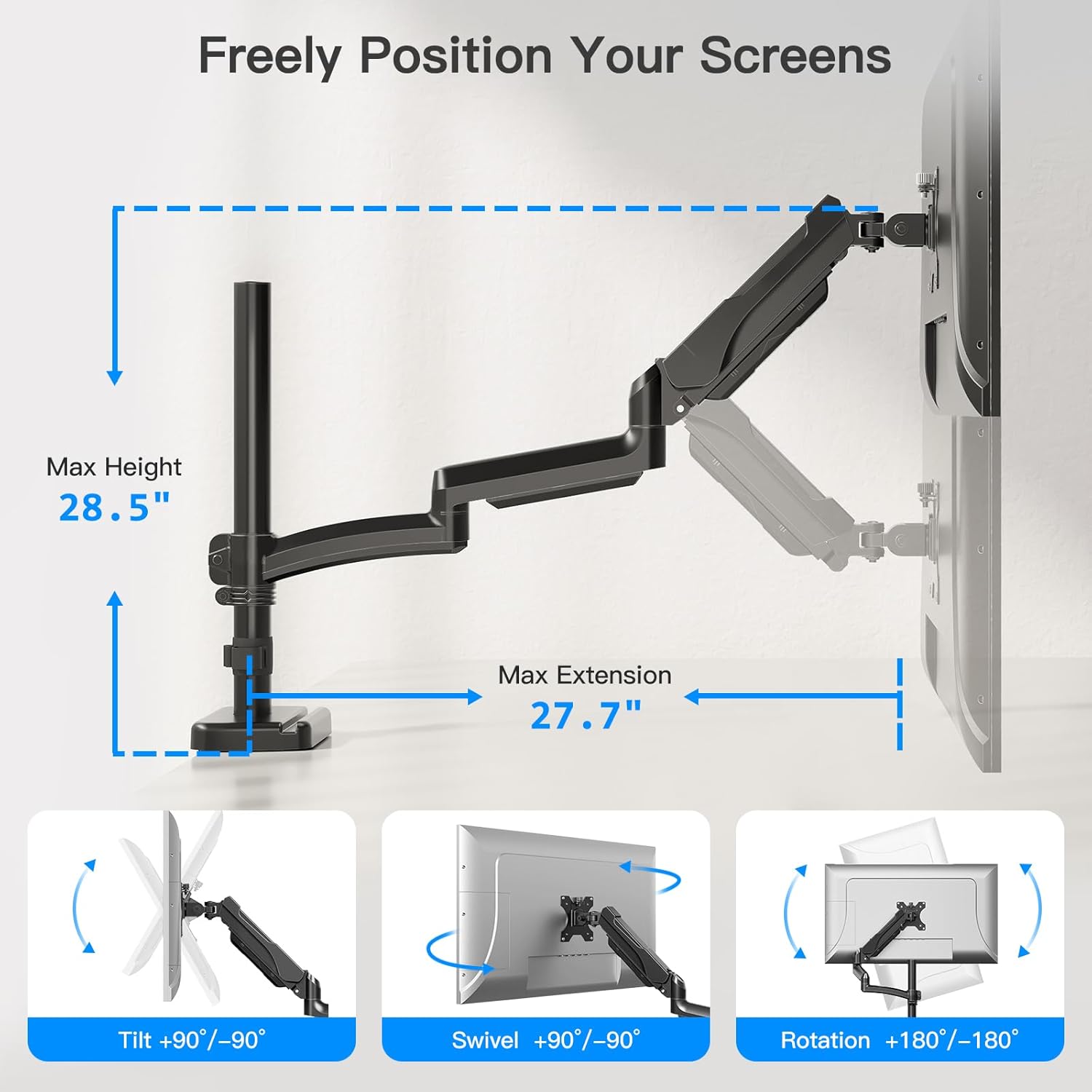
EXTRA LONG MONITOR ARM: Our monitor arm desktop mount features an extended arm that extends up to 27.76”, perfect for deeper and larger desktops. This single arm monitor mount saves over 80% of desktop space, maximizing the use of limited space. The integrated cable management feature on the monitor arm allows you to neatly route cables for a cleaner, more organized workspace.
FITS YOUR MONITOR: Our single monitor arm perfectly fits most flat or curved LCD/LED screens from 13′ to 32′, holds from 4.4 to 19.8 lbs, and is suitable for VESA 75x75mm and 100x100mm. Compatible with monitors from ASUS, Acer, Samsung, LG, AOC, Dell and others, including but not limited to 32′, 30′, 28′, 27′, 25′, 24′, 23′, 22′, 21′, 20′, 19′, 17′ monitors.
ADJUSTABLE SCREEN ANGLE: The adjustable single monitor mount has a wide range of screen movement. +/-90° swivel for easy screen sharing, +85°/-45° tilt for the perfect screen angle, and 360° rotation for landscape or portrait viewing. Makes it easy to find the perfect monitor position for comfort and productivity.
IMPROVES YOUR VIEWING EXPERIENCE: Our single monitor mount has a taller pole that provides 30% more height and a wider viewing area than other monitor mounts. It holds the monitor up to 28.5 inches above the desktop, giving taller users more height adjustment options for optimal viewing and a standing office.
STURDY CONSTRUCTION: The gas spring arms of this PC monitor mount are tested to withstand 20,000 cycles of motion to ensure long-lasting performance. The sturdy construction provides excellent stability even when moving or adjusting. With clear parts labels and instructions, you can choose between clamp mounting (for 0.39 to 2.76 inch thick desktops) or grommet mounting (for 0.39 to 2.76 inch thick desktops).


mafitzinger –
Does the job well.
Love this. I never thought I wanted a monitor mount but I got one because I was getting one for my dad who has a messy desk. Oh wow! now I have more room on my desk and I have the choice of pulling my monitor up close when I am lazy and want to lean on my desk or if I am multitasking, I can push it up and out of my way but still see what is on the monitor. So for things like scanning, I can scan my old pictures and still use my desktop. It mounts very securely on the back of my desk. It is well padded and has a very large range of desk thickness adjustments. It also comes with a clamp if you want it in the cable hole in your desk.I has adjustment for they gas spring up and down arm which works great. It swings side to side. I can fold almost straighten back. I think only wall mount would have the scissor type in and out to do that perfectly. And I can twist my monitor side to side and into the vertical position so easily that now I might actually use it like that for some things. Before it would hit my desk. I didn’t know how nice it is to just push the monitor to one side and angle it so it doesn’t HAVE to be right in front of me all of the time. I highly recommend a monitor mount and this one works great for a great price. We have them at work but they are big and heavy. This one is much more slimmer but still is very sturdy and the cable holder/hiders work well. They might be a bit hard to get the cables in and the cover slide back but it looks great when done.Don’t forget you might need a long power cord and/or video cable if you have a deep desk and will be pulling the monitor forward all the way.
JudgeDredd –
IT WORKS to almost perfection
This contraption has changed my computer working experience. There are only two things that disqualifies it for a 100% perfection, thus only a 99.9%. 1- I couldn’t adjust a perfect horizontal level it is always off by 1%; 2 – I don’t even remember what that was.This is my second desk mount and for me and my computer set up it is simply perfection. Up down, tilted sideways, close to me far away, standing seated. I have relaxed a lot as soon as I adapted this thing to my desktop, ah and when I want it out of the way to reclaim my desktop real estate, it willingly obliges. I have not had any problems handling it either, apparently it is well built for this constant changes. There is no need for me to share videos or photos, the thing works. I remember now the second insignificant “flaw”; in my monitor, at the point of contact with the mount and its four-screws base, the mount’s X base does not cover all of the inner cables shown inside my monitor (it is open right there because the monitor’s base, a gaming ASUS, covered it. A dedicated inexpensive felp paper cloth would have taken care of that possibility and the manufacturers did not think of that.
Gumshoe Jackson –
Decent inexpensive monitor arm
A decent, inexpensive, slightly longer than normal arm. It has 3 segments vs the usual 2, but each segment is a bit shorter.It’s a bit flimsier than your standard arm, and the adjustment motions not very fluid. If you’re not going to frequently adjust it, and your desk is very study, it’s a good buy (shaky desk? this thing will wobble a good bit).
BLEST –
Get this. It’s what it says it is.
Exactly what I was looking for. Nice and long, multiple bends, holds up my 20lb monitor perfectly. Happy with this purchase and got it at a great price.
Chris Vold –
sturdy, affordable and versatile
These work great for my two monitor set up. They are affordable and save a lot of desk space. They clamp to the desk well without any wobble. I can easily raise the arms to transition to standing which is the main reason I got them.
Amy M Shipman –
Great for small spaces, sturdy.
Works great. I use it with a 14lb 27imch monitor. Sags just a tiny bit when the arm is fully extended, but is still sturdy. Make sure your desk (or whatever you have it mounted on) is weighed down, especially if using it fully extended, as it may cause the desk to tip. Wasn’t too hard to put together. Comes with a tool holder so the Allan keys are always ready to go if you need to adjust something. Works great if you have limited space. I use it so I can use my monitor in my recliner, then push it against the wall, out of the way when im not using it. The three arms make for great reach, i am glad i didnt go woth a two arm model. Highly recommend.
Jason –
Excellent for my A320 overhead panel!
Just what I needed! Unlike most arm extenders this was the inly one offering me extended horizontal distance. I have an Airbus cockpit home simulator and needed to hold my overhead panel. My only complaint is I wish it had the vesa attachment connected directly to the arm as the current setup leaves a little gap creating consistent noise everything the panel is touched, I did a workaround fix by inserting a little piece of plastic inside the gap.
Crystal Jarvis –
Fantastic arm reach and simple setup.
I have numerous arms attached to my desk to keep my desk clear to maintain usability. This monitor arm is by far allows the most flexibility for me to arrange all of my monitors and laptops. My desk is deep and requires an extra long reach and this product is the only one that I have found that meets my needs. The design for attaching the monitor is super simple.
Michael Barker –
Have been using with a 24″ Dell monitor for a few months, and it’s worked great. Setup was a breeze, and the adjustability is very nice. It claims to be able to hold 32″ and 20lbs, which I would agree with – it has absolutely no issue with 24″ and ~14lbs.
V.K. –
This arm is very versatile with its positioning, and the price compared to some other stands is very attractive.It was a little finicky dialing in the tension on the spring just right so my monitor wouldn’t drift, but once I got it it was able to maintain itself within most of the range of motion.The stand’s vertical pole would technically allow for multiple monitors on it, but I don’t know if I would trust the clamp mechanism with that much weight.I don’t have a hole through my desk so I mounted with the edge clamp. I feel like mounting through a hole would provide more even tension on the clamp and result in a bit more confidence, but that’s just speculation.Cable management options are really nice too, so it looks a lot better than when I had my cables dangling around behind my monitor.This is a great quality stand and I would highly recommend it for someone who wants a bit more range of motion to their monitor.
Autumnbolt –
It’s quite a strong mount, I have a monitor that’s on the heavier side and this doesn’t bend or sag.the addition of a phone holder in the base cap is really handy, spring tension is easy to adjust and all the tools and accessories that you may need are there, and the cable management works great as well, I had no problems fitting the cables in.
Amazon Customer –
Firstly, NOT a “Dual Monitor Mount” But the pictures also counter that title. – 1 starWhile the mount is good, although the plastic feels cheap. The copy and pasted title really puts off the sellers accountability.Otherwise, compact but still enough packaging material in the box. Comprehensive instructions. Good layout and mounting options. Useful mount for people who want one/need one.
Dan White –
Overally, this is a decent monitor arm, for decent value. Depending on how often you think you’re going to move your monitor around, I would recommend a sturdier arm. If you think you’re going to set it and forget it, then this is a solid buy.I have two gripes with this though; the first is how the extension part of the arm attaches to the main pole, and the second is how the vesa mount, once screwed into the monitor, attached to the rest of the extension as well. On the pole side, the extension clamps to the vertical pole with a simple plastic grip that you screw together. This could have been significantly improved, and provide a lot more peace of mind if it had some sort of rubberized inner portion instead of being just smooth plastic. I’m kind of fearful that the plastic will give at some point and slide down the pole forcefully. On the vesa side, the bracket screws into your monitor just fine, but the bracket slides onto a housing on the arm, and then is pinned in place by a single screw; this is a little difficult to describe, but what you want to know is that it’s not screwed in place, it’s just held there, and can rattle easily. There’s a lot of movement that can’t be eliminated.These aren’t really issues if you think you’re going to put your arm into position and then never move it again, but if that doesn’t sound like you, then maybe you want a sturdier arm.