





Product description


1 Gravity Sensor
2 Visual Focus
3 Adjustable Volume
4 Low Power Consumption
How to use?
Turn on the timer by pressing the ON/OFF button.
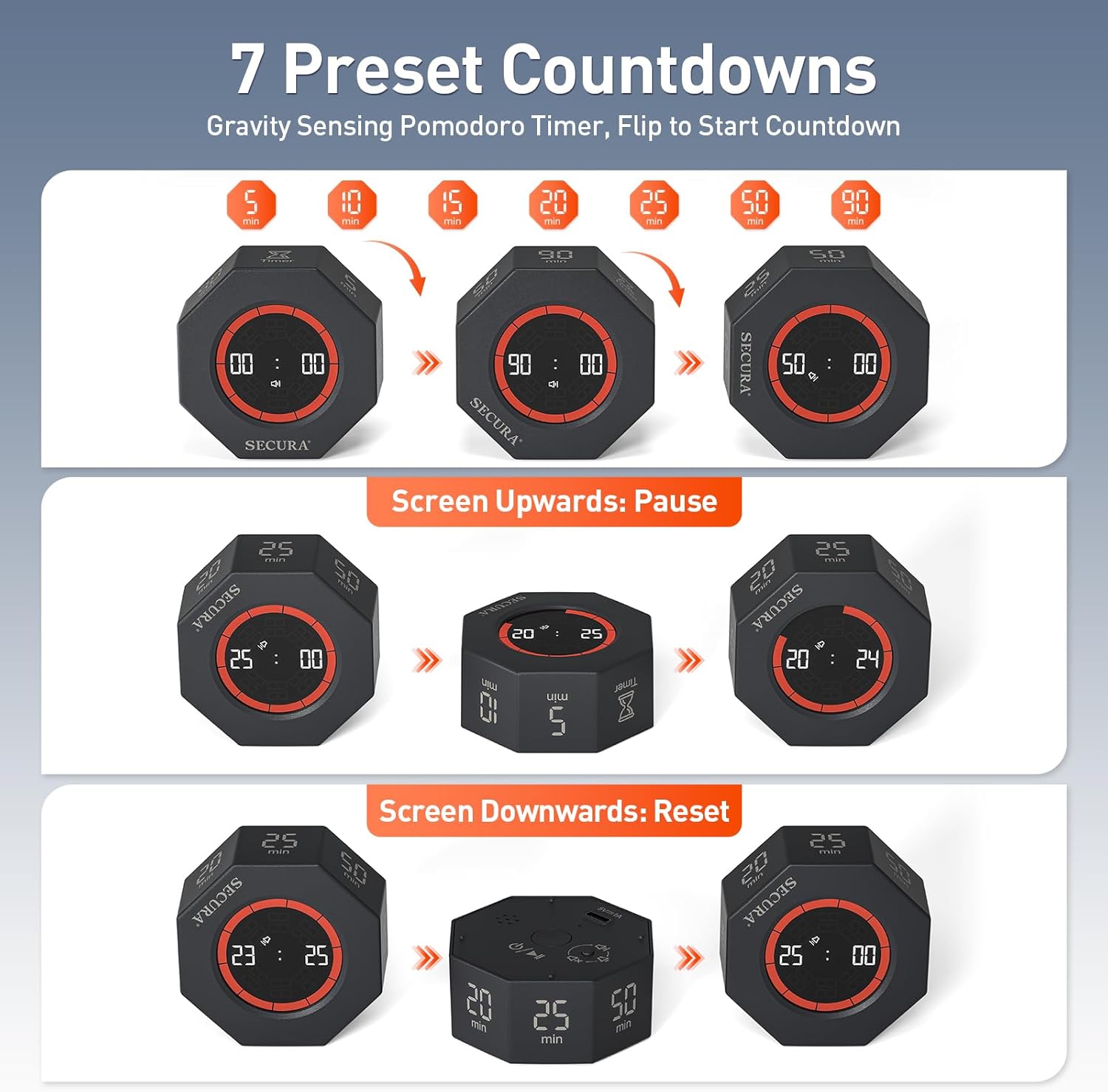
Flip the timer with the number you want facing up to start the countdown.
The video showcases the product in use.The video guides you through product setup.The video compares multiple products.The video shows the product being unpacked. How to use? Merchant Video
Pause timer
Just turn the timer screen facing up to pause the countdown.
The video showcases the product in use.The video guides you through product setup.The video compares multiple products.The video shows the product being unpacked. How to pause? Merchant Video
Reset
Turning the timer screen down or “Timer” facing up will reset the countdown.
The video showcases the product in use.The video guides you through product setup.The video compares multiple products.The video shows the product being unpacked. How to reset? Merchant Video
Count up
Turn on the timer by pressing the ON/OFF button.
With the “Timer” facing up, the screen displays 00:00, then press the power button once to start counting.
The maximum count-up time is 99 minutes 59 seconds.
The video showcases the product in use.The video guides you through product setup.The video compares multiple products.The video shows the product being unpacked. How to count up? Merchant Video
How to set the volume?
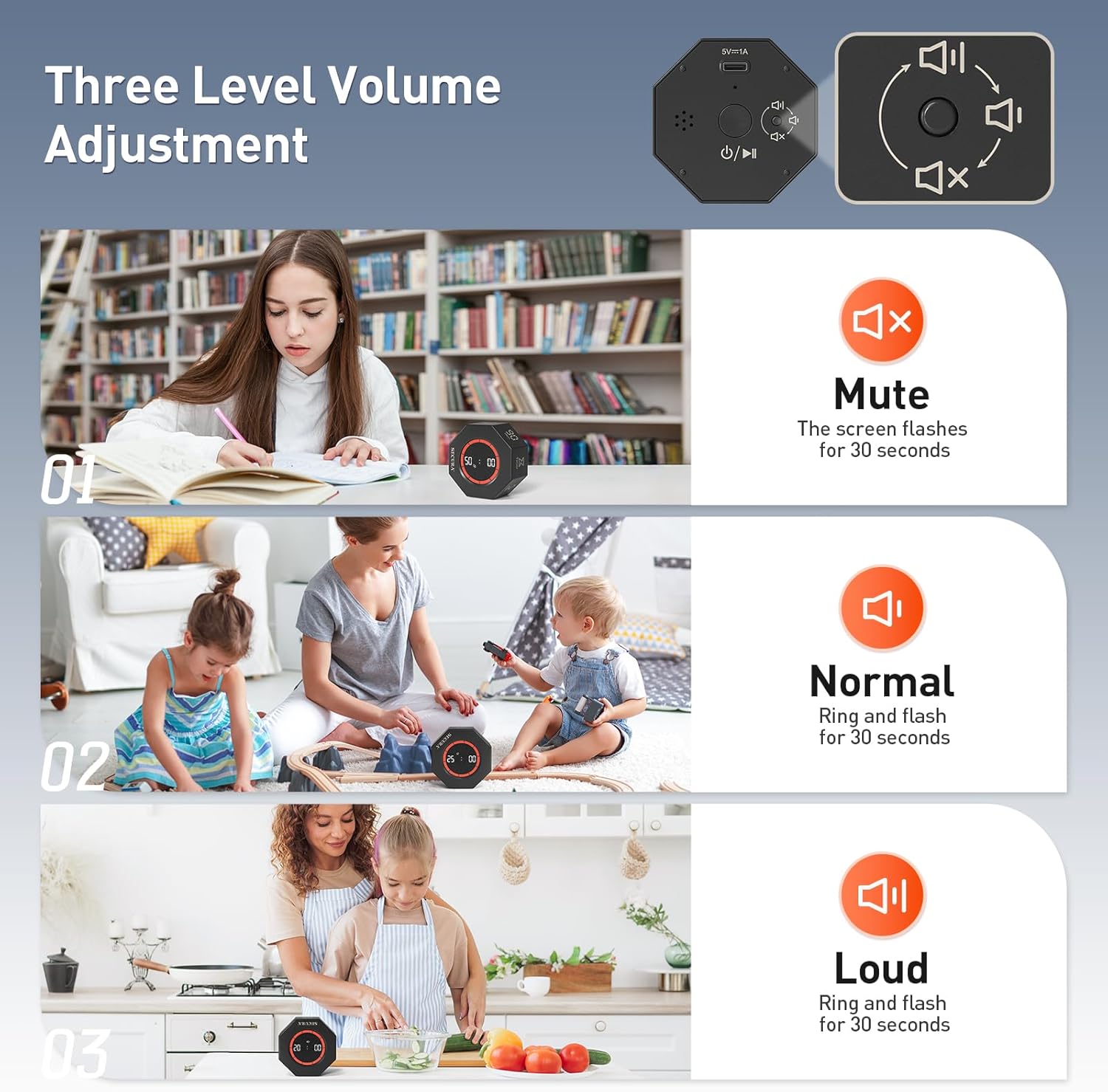
Press the volume button on the back to switch between mute→loud→normal.
The video showcases the product in use.The video guides you through product setup.The video compares multiple products.The video shows the product being unpacked. How to adjust volume? Merchant Video


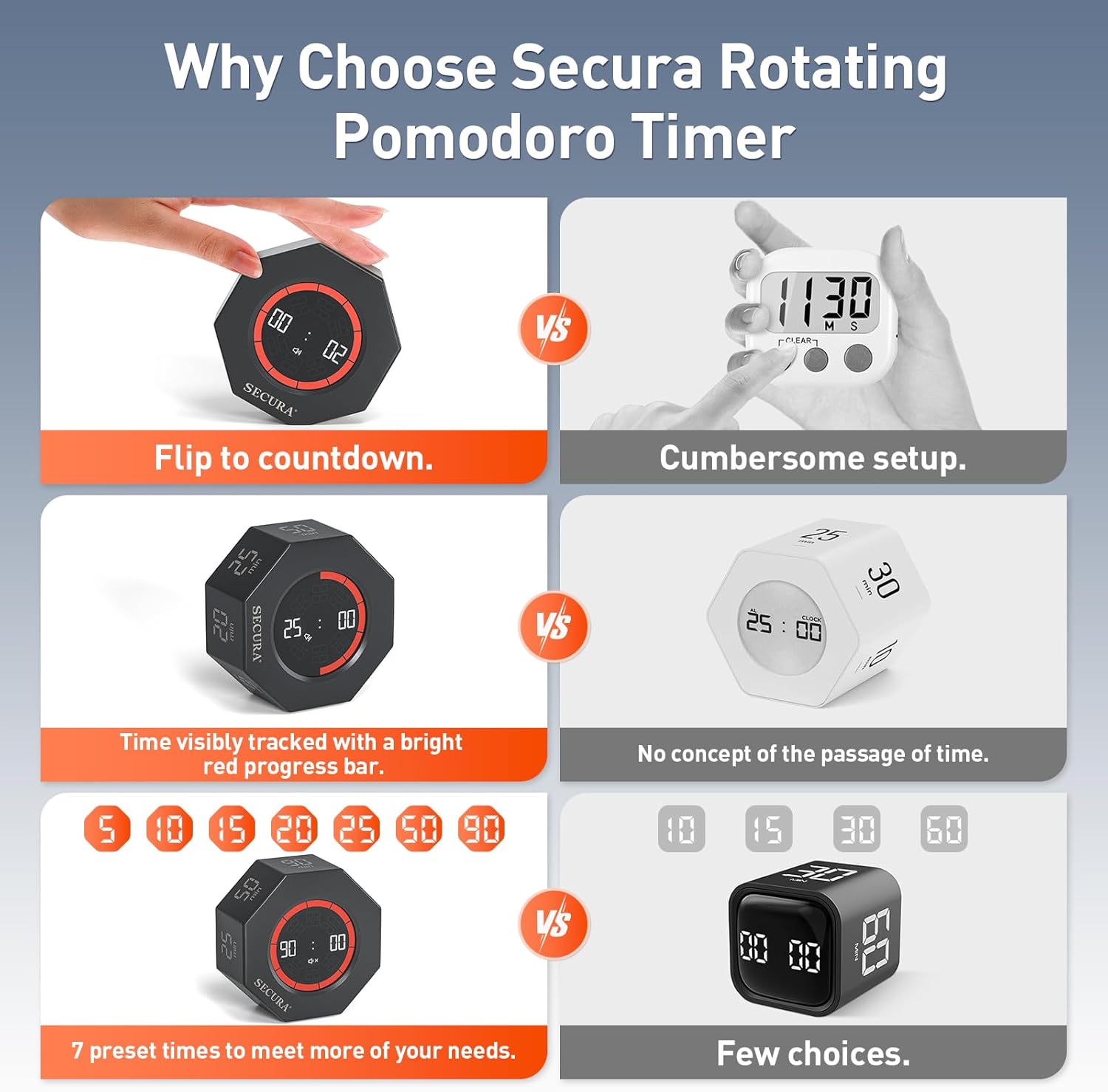
7 Pre-set Time: Secura eight-sided rotating timer offers 7 preset times (5/10/15/20/25/50/90 minutes), perfect for pomodoro timer. Just flip the timer with the numbers facing up to start the countdown. Pause the timer with the screen facing up, reset it with the back/”timer” side facing up.
Visual Progress Bar: The unique 10-segment progress bar visually displays the passage of time, with each segment representing 1/10 of the set duration. A focus enhancement tool designed for ADHD and kids, offering clear visual cues to help better manage tasks.
Stopwatch Function: This desk timer supports a maximum of 99 minutes and 59 seconds for count up, with an alert sound and flashing for 30 seconds when the time is up, and the screen will automatically turn off after 60 seconds. Different modes meet your various needs.
Adjustable Volume & Rechargeable: 3 adjustable volume settings (Mute/Normal/Loud) make this productivity timer adaptable to various environments. USB charging design ensures continuous operation, saving you the extra cost of purchasing batteries. (Do not use while charging)
Portable & Multi-Use: The cube timer is compact and stylish, easy to carry and fit into your pocket or bag. This ADHD timer is perfect for office, school, classroom, kitchen, work, meetings, study, reading, cooking, gaming, exercise, and tasks.


Kristen Lynn Herr –
Homework Life Saver!
This has helped with our adhd homework time! It gives my son dopamine he is lacking from the adhd to beat the clock! Turned 1 hour math into 15 MINUTES! LIFE SAVER!
Amazon Customer –
Effective timer
This timer is easy to use. It works well. The alarm could be louder. The multiple options for timing make it easy and quick to set.
Jesus –
Better than an app
Works as expected. Pomodoro really works and is easier to do it with a physical timer than a browser tab.
Joe Deneca –
Not awful but wouldn’t be my first choice.
Wouldn’t buy again but also wasn’t awful. It auto turns off when not in use, which can be great – but I needed it to set a timer in my classroom. So, every time I have to turn it on and then wait for it to understand the time I want. I ended up buying a different one. I kept this for emergencies.
Helver Olarte –
Recomendado
Excelente producto
R. Carr –
This timer is loud enough!
I can hear this timer!The day I got this, I cooked dinner, and the sink was full of things I couldn’t run through the dishwasher. The task was overwhelming, but this timer was done charging. So I decided to “chunk” it. I could do a chunk now and do another chunk later. I could do that much.The timer has 7 preset times (5/10/15/20/25/50/90) and a stopwatch. I hit the on button and set it with 25 at the top. The numbers 25 on one side and 00 on the other appeared and began counting down. Ten segments around the rim disappeared as 1/10th segments of 25 minutes passed. I could look and easily see how much time was left.Just as dried the last baking sheet, the clock hit zero and the alarm went off. Being able to hear the alarm was wonderful. I’m old enough that I can’t hear some electronic alarms. Turns out I’d finished the dishes in 25 minutes!I like this timer. I even used it to time writing this revie
Chyane Strickland –
Studying assistant
Honestly the best. Its really great for studying.
muffin –
muffin
simply amazing,,, just what i needed at pool side during laps
LittleBlessings –
Absolutely love this little timer. Quality made. Timer options: 1,3,5,10,15,30,60 minutes + generic counting up option. Depending on which of the 8 selections chosen, the time display rotates to orient with the selection. Appreciate the variety in timer options for short or longer tasks. Turn on via easy click button on back. Lay down, face up, to pause timer. Three sound options: high, low and off (timer only blinks). Overall give this product 10 out of 10 for sleek design and ease of use.
Amazon Customer –
I love this timer. I use it for my training sessions when they’re in breakout groups and it works perfectly. Also great for using it for the Pomodoro method and time management.
CanadianK –
In these days of our phones doing everything, there is something very old-school about the Secura Pomodoro Timer.All it does is count-down in pre-programmed lengths of time, or can be used to count up. This timer does only one thing but it does it well and is beautifully designed. It also comes with a complete manual. The timer isn’t tricky but I appreciate having everything spelled out so clearly.Why should you get this? My number one reason is to stay on task. The Pomodoro technique helps me with that.I had a Pomodoro App on my phone but this works better precisely because it is so low-tech. Starting/stopping a timer for me involves picking up and unlocking my phone. Which means first I have to find my phone and once the phone is unlocked, risk using my 5 minute break, or longer on mindless phone stuff. Those of you living with ADHD will recognize the challenge.This allows me to put my phone away out of sight, and focus on the task I have in front of me.This is a family with three generations of neurodivergent members struggling to stay on task. As the oldest generation I need to model and teach the strategies that work well to the younger generation.The unexpected benefit of this timer is when children are in the room. I don’t have to pick up a phone to start/stop the timer so the child isn’t distracted by wanting to look at either my screen or their screen. This old-school, single task tool allows me to use timers without introducing more distractions. If the timer is just for me, the child doesn’t get knocked off task. It is also useful for playing my “beat the timer” mind-game I play either with the kids or just myself. (For example, “Can I finish cleaning up the kitchen in 15 minutes?”) Alternatively, I can commit to 10 minutes of any task and give myself permission to walk away when the timer goes off.My watch has had a count-down timer for at least the past 25 years, and doing 15 minute chunks of work has always been tracked using that timer. But there are times I need a longer or shorter time, and this offers me that flexibility.
Kai –
One thing I hate about setting timers on my phone, is how many steps there are to setting it (not to mention all the distractions). I have been eyeballing these rotating timers because as long as it’s on, all it takes is two movements to control it; you rotate the clock in standing position to choose a timer length, or place the timer on its back to pause the timer. Once your timer is chosen, it will automatically begin!This specific timer has times ranging from 5 mins to 90 mins. From 5 – 25, the timers go up in increments of five; there is also a 50 min and 90 min option. The face of the timer is a circular screen. When the timer is on, the time will countdown in large numbers in the center, with a red band around the outer edge that will dissappear (in 30 second increments) as the timer decreases. I appreciate the addition of this red band as a visual representation of the timers remaining time. I’m a person who is very visual, I find I’m better able to understand where I am in time thanks to this band. Also shown on the screen is a little icon for the volume level.The back of the timer has two buttons; a circular button in the center (for power and start/stop), and a tiny button to the right of it for volume. To the left of the power button there are holes for the speaker and above it is a usb-c port for charging. There are two volume level options for the timer (hi & low), as well as the option to mute it. I don’t find the timer to be overly obnoxious in the noise it makes or its sound level; it uses a simple beeping sound. It’s disappointing that you don’t have more volume options. This could be limiting for some people depending on your environment and surrounding sounds.A big positive for using an independent timer is that it limits distractions that normally come along when using your phone as a timer. This timer has really helped me in the morning when getting ready for work. I have adhd and normally I set and reset my timer over and over in order to remain on time. This timer allows me to quickly rest my timer, and quickly choose how long I need. I really want to have one of these in every room, seriously!
avid reader –
If you have timed tasks to complete or a reminder to take a break away from screens etc this makes it easy, as long as the amount of time you want to pass before the alarm goes off is one of presets (5/10/15/20/25/50/90 minutes). The presets save you time and hassle ; you turn the timer to show the correct time on the top side (when powered on) and it starts counting down on its own. Change your mind about the time? Rotate to another number of minutes and it starts again from there? Pause it? Turn the timer with the countdown face up to pause or face down to stop it (dark screen but not powered off). A switch at the back to set two volume levels or mute and a power button with the port for USBC cable to charge it. It’s small and lightweight but the digital timer readout is easy to read with blue digital light countdown and alarm level indicator and read bars around the edge of the screen that disappear as time increments pass. If the volume is not muted the timer beeps when it gets paused or restarted as well as when the time is up.We have lots of the timers that you set in however many seconds/minutes/hours you want but for some tasks this works way better. There is also a count up timer that goes up to 99 minutes if you’re minding your time at work or home or school. Great for kids and adults though some brighter colours targeted to kids might make using it more fun for them.Fabulous preset timer if the times match what you need.