


From the brand


All-in-One Family Calendar

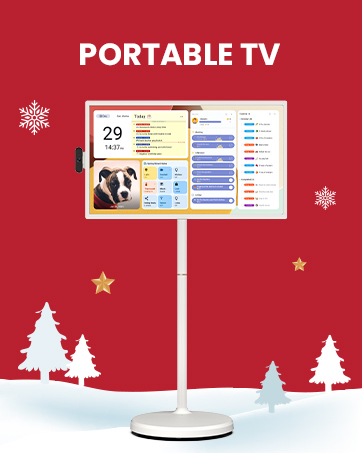
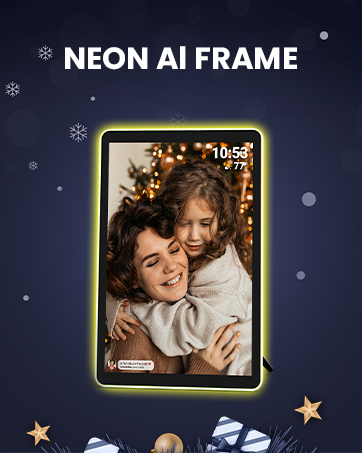

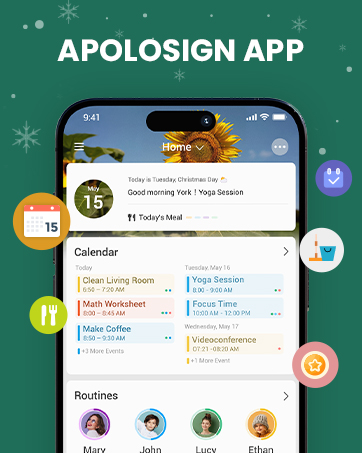

First Dual-Mode Digital Calendar — In Calendar Mode, apolosign calendar stay focused with Auto Sync Calendar across Google, Outlook, iCloud & more. Planner and Family Organizer keep schedules in one place. Switch to Android Mode to create a Dashboard and smart family hub
Reward-Based Chore Chart, Routine & Meal Planner — Turn chores into fun while keeping the whole family organized. This electronic calendar lets kids earn rewards for completing daily tasks and helps build healthy routines. Create color-coded to-do lists for groceries, shopping, wish lists, and plan weekly meals to stay on top of family dining — all in one place via the Apolosign App (Currently available only in the U.S., Canada, and the U.K.)
Experience AI Voice Assistant & Smart Home Control — The Apolosign Smart Calendar lets you set alarms, check the weather, or manage tasks by simply talking to your calendar using four built-in microphones. Now preloaded with Google Gemini AI voice assistant, seamlessly connect with Google Home to monitor and control your smart home — doorbells, cameras, and more, all on one screen
Smart Photo Frame & Live Screensaver — The 21.5″ HD touchscreen eCalendar displays memories from Google Photos and more, seamlessly, no subscription required. Personalize with videos, schedules, clocks, or a mix. Auto Brightness adapts, Sleep Mode saves energy. Beautiful faux wood frame for wall use
Customize Your Widget Dashboard — Smarter eCalendar: Add and arrange the widgets you need — calendar, chores, meals, weather, doorbell, music controls, stocks, and more. Supports multi-page widget layouts, so you can view more at a glance. Customize your dashboards for a smart family hub. Whether syncing calendars or troubleshooting, our expert support team is available around the clock to assist you


Chad C. –
Amazing calendar and super useful android tablet with no subscription required!
I absolutely love my 21.5” Apolosign calendar! It has made organizing our busy household so much easier. One of my favorite features is the meal-planning section — I can add recipe links right on the board so everyone knows what’s for dinner without me having to explain it.I have two kids at home, and I use the calendar to list their chores and even add rewards for completing them. It helps keep everyone on track. I also use the large calendar space to keep up with my girls’ volleyball games, doctor appointments, and the custody schedule for my granddaughter. The best part is that I can share the schedule with my older kids who don’t live at home, so everyone stays in the loop.Another huge bonus is that this isn’t just a calendar — it works as an Android tablet! We keep it in the kitchen, and my kids watch Netflix and Hulu on it. I also homeschool, and I can easily play homeschool videos for my kids right from the screen. When it’s not in use, it doubles as a digital photo frame with a screensaver of our favorite pictures.And you don’t have to buy any subscriptions! You buy it and you are ready to use it!!!Overall, it’s super versatile, easy to use, and perfect for families. Highly recommend!
Robinson Taylor –
Excellent!
Loved this! I really appreciate how there are no subscription fees like the Skylight. The interface works great. Setup for Gmail was super easy. The display and screensavers are gorgeous. I was able to buy a tv stand and hook it up to that so it could sit on my counter. Very sturdy and strong. The screen is large enough to read from across our kitchen. Would highly recommend.
LuckyJax –
The best digital display of them all, hands down
I spent months researching digital calendars and compared all the big names – Skylight, Hearth, and others. While they’re popular, Apollo Sign was the only one that truly checked every box for me.First, the aesthetics. As an interior designer, design matters, and Apollo Sign actually looks beautiful in my space. It comes in multiple sizes and colors, and the one I chose fits perfectly – clean, modern, and elevated.What really sets it apart from competitors: no subscription fee. That was a huge deciding factor for me. To not have to pay monthly for simple features like slideshow is great – Apolosign is not trying to milk its customers.I also love that it’s more than just a calendar. It functions as a command center – you can display your calendar, routines, and to-do lists and use widgets like weather, news, YouTube, Spotify, etc. The photo screensaver is another standout and doubles as a gorgeous digital frame and blends seamlessly into my home.I genuinely have no complaints. If I had to offer suggestions, I’d love:1. Routine streak tracking for motivation2. A dedicated goals section in addition to to-dos. I track fitness goals so that would be a plus3. I love motivational quotes so a place I could see all my fav quotes or a quote of the day is inspiring.These feel like easy, future enhancements, and I hope the Apollo team continues iterating because the foundation is excellent.I highly recommend this. I live alone and love it, but I can easily see how valuable it would be for families too. Everything in one place, done right.
Richard Cooper –
Helping Keep Our Family Organized
We’ve been using the Apolosign digital calendar for a couple of weeks now, and it’s been great so far. It’s made syncing all of our family calendars incredibly easy, so everyone knows what’s going on without constant reminders or texts.We especially love the task reminders—it’s simple to add shared to-dos for the entire family, which has helped us stay organized and on track. The photo feature is another favorite; using our pictures as a screensaver makes it feel personal and warm, not just functional.Setup was surprisingly easy. The design makes it simple to hang up, and the instructional videos were clear and helpful for learning all the how-tos. We were up and running quickly without any frustration.Overall, it’s a well-designed, practical, and family-friendly tool that’s already made daily life smoother. Highly recommend for busy households looking to stay organized in one central place.
s fender –
Great product
Nice clean look, options to add more than one user and multiple emails so each user can add to the calendar and everyone can see it all and you don’t have to login and upload you can use your phone. You can add chores for the kids, create a shopping list. Easy to hang on the wall and also has a magnetic hooking mount to ensure it is secured.
Chris Richey –
Worth every penny
Has been very great and works perfectly for what we need it for. Calendar accounts are easy to add and downloading additional apps through Play Store makes it even better – we were able to download and add the app for our playroom camera for our kids so we can see what’s happening down there when doing stuff in the kitchen.Highly recommend this as it’s easy to use and set up, and the touch screen display is great for easy interaction and readability. Routines are a great way to get our kids involved in different chores too.
Sara Mann –
The Apolosign digital calendar is fantastic! Its intuitive interface makes scheduling a breeze, and I love the customization options. Syncing my kids and I calendar with my devices is seamless, ensuring I never miss an appointment. The reminders are a game changer for staying organized. Highly recommend this digital solution for anyone looking to simplify their planning!